Logitech Wave Keys Review: 2 Weeks with an Ergonomic Keyboard

Hello, this is NRLayer.
For the past few months, I’ve been quite satisfied with the typing feel of the Logitech Alto Keys K98M keyboard. However, the longer I typed, the more I started to feel a stiff strain in my wrists. So, I went looking for a keyboard that could offer a bit more ‘wrist protection’ and discovered the Logitech Wave Keys at a local store.
If you are looking for a combination of products that naturally elevate your wrist angle, checking out my Logitech Lift Vertical Mouse review as well will be helpful. Many users report that posture stability improves significantly when these two products are used as a set.

In this post, I will summarize what I’ve felt while actually using it for the past two weeks.
Logitech Wave Keys: A Real Solution for Wrist Protection?
If you work in front of a computer all day, you’ll likely relate. Using a standard keyboard for long periods causes your wrists to bend slightly inward. For me, after a few days of intense work, fatigue builds up and my wrists start to feel stiff.
Ergonomic keyboards come in various designs, sometimes even with fully split structures. However, many people find the layouts unfamiliar and difficult to adapt to.
I delayed buying one for that very reason, but the Wave Keys feels like it naturally corrects wrist angles while maintaining a layout almost identical to a standard keyboard.
I didn’t need any special adaptation time, even on the first day of use.
If you are looking for a firmer mechanical feel in a similar price range, it’s worth comparing it with entry-level keyboards like the Q75PBT. While the Wave Keys has a familiar layout, the typing feel is completely different, so your choice may depend on your purpose.

Where Does the Comfort of Logitech Wave Come From?
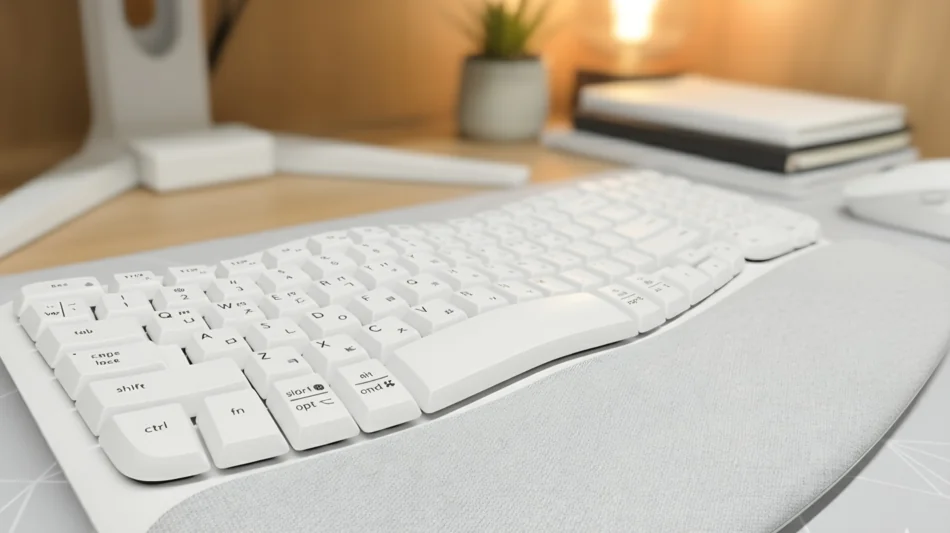
As the name suggests, Wave Keys features a key layout that rises gently like a wave.
When you place your hands on it, both hands naturally point inward, relieving tension in your wrists.
What impressed me the most was the integrated palm rest.
It has a memory foam structure with a waterproof coating, so it supports the wrists softly, and I felt I wouldn’t have to worry about stains.
To fully utilize the comfort of the palm rest, a mouse that maintains the wrist angle is advantageous. The Logitech Lift Vertical Mouse matches the height of the Wave Keys’ palm rest well, preventing posture breakdown during long work sessions.

It’s been two weeks, and as expected, there is almost no feeling of wrist bending even after long periods of typing.
- Colors: Available in Graphite and Off-White.
Graphite is close to a charcoal gray color.
Off-White would likely suit a bright desk setup well, but I chose Graphite because I wasn’t confident about keeping it clean. - Size: The specs are 375.97 x 218.91 x 30.53 mm, weighing about 750g. It’s a full-layout keyboard including a number pad, but designed to be space-efficient like the K98M keyboard.

Real-World Performance: Connectivity, Typing Feel, and Logi Options+
Connectivity is available in two ways: wireless via the Logi Bolt USB receiver, or via Bluetooth. Like other Logitech keyboards, you can register up to three devices and switch between them with a single button.
I connect it to my PC, tablet, and smartphone respectively, and the switching speed is fast with almost no lag. The typing feel is not stiff like a mechanical keyboard, and it is quiet enough to use in shared spaces without hesitation.
Power is supplied by two AAA batteries rather than being rechargeable, and it is said to last up to 36 months according to official standards. While not being rechargeable might seem slightly inconvenient, my experience with the Logitech K380, which also uses batteries, suggests that in reality, you hardly ever have to worry about it. I can barely remember the last time I replaced the batteries.
And one of the things I liked the most is the ability to use the Logi Options+ software. You can use shortcuts or function keys to configure settings like toggling a ChatGPT popup window with a single button.
Logi Options+ also supports the Logitech MX series and ALTO K98M.
Read Before Buying: Honest Pros and Cons Summary
Let’s start with the good points.
- Much more comfortable wrists.
Thanks to the palm rest, hands are placed stably, making the typing posture natural. - Fast adaptation.
Maintaining a standard layout allowed me to use it immediately from day one. - Quiet.
Thanks to the membrane typing feel, it is usable in quiet spaces like offices and cafes. - Stable connectivity.
Both Bluetooth and Logi Bolt respond quickly, and device switching is smooth.
There were also some downsides.
- Not rechargeable; batteries need replacement.
- No backlight, which can be inconvenient in dark places.
- Being full-size, it is somewhat large and heavy for portability.
- Made of recycled plastic, the appearance might feel a bit plain.
If you want a mechanical typing feel in a similar price range, comparing it with products like the PL108W or Pebble 75 (Joyakdol) will make your selection criteria clearer. Wave Keys has strengths in quietness and comfort, while the other two models fit those who want a definitive tactile feel.
NR Layer’s Perspective: Who Needs It Most?
Wave Keys is designed to naturally correct wrist angles with a familiar layout instead of complex structures or excessive designs. When used with the Lift mouse, also from Logitech, it feels like using a matched set.
When I went to the hospital recently, I noticed the keyboard and mouse the doctor was using in the consulting room—it was exactly this Wave Keys and Lift set.
Conclusion
In short, Wave Keys is a “good keyboard for consistent use.” If you type for long hours like me, I think it’s worth trying out at least once.
The next post will be a review of the Logitech Lift Vertical Mouse.
Logitech Wave Keys FAQ
If you are looking to change your entire desk setup, referring to the reviews below will make it easier to compare according to your purpose.